 English
 中文
中文  english

What Is an ESD Protection Diode?
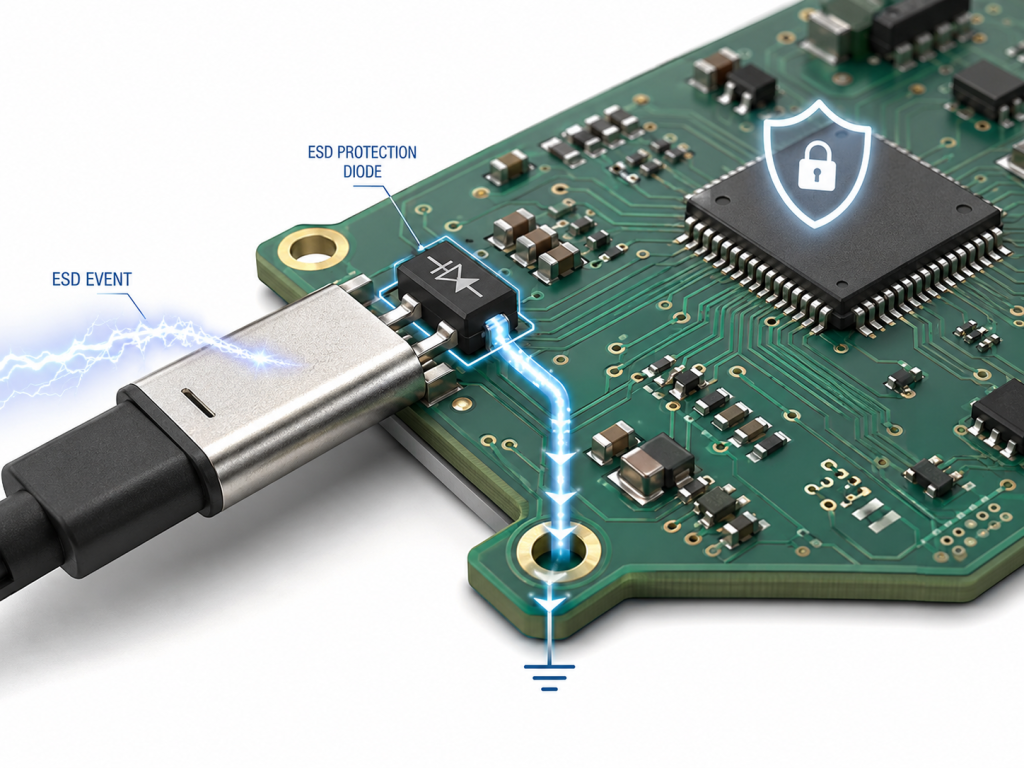
An ESD Protection Diode is a semiconductor protection device that clamps short voltage spikes caused by electrostatic discharge. It is commonly installed between an external interface and a sensitive IC pin.
Electrostatic discharge can happen when a person touches a connector, plugs in a cable, handles a PCB, or brings a charged object close to an exposed port. The discharge event may last only nanoseconds, but the voltage can be high enough to damage microcontrollers, communication ICs, sensors, power management chips, or RF front ends.
In a PCB, the diode works like a fast safety path. Under normal voltage, it has high impedance and does not disturb the circuit. During an ESD event, it switches into conduction and diverts the energy away from the IC.
Common protected areas include:
- USB and USB-C connectors
- CAN bus and RS-485 ports
- HDMI, Ethernet, RF, and antenna interfaces
- Push buttons and keypad lines
- External GPIO pins
- Sensor cable inputs
- Battery and charger connectors
- Programming and debugging ports
The key purpose is simple: let the transient current flow through a controlled protection path instead of through the IC.
How Does an ESD Protection Diode Work?
An ESD Protection Diode stays off during normal operation and turns on rapidly when the voltage exceeds its breakdown or clamping behavior range. This fast response helps reduce the voltage seen by the protected IC.
A typical ESD event enters the board through a connector or exposed metal contact. Without protection, the spike may travel along the trace and reach the IC pin. With a protection diode placed correctly, the transient current is redirected to ground or another reference point before it reaches the vulnerable device.
The working process can be understood in three steps:
1. Normal operation:
The signal voltage stays below the diode’s working voltage. The diode remains in a high-impedance state.
2. ESD event occurs:
A sudden voltage spike enters the protected line. The diode begins to conduct very quickly.
3. Energy is diverted:
The current is routed to ground or a reference rail, while the protected IC sees a lower clamped voltage.
For high-speed signals, the diode must also have low capacitance. Otherwise, it may protect the circuit electrically but degrade signal quality.
Is an ESD Protection Diode the Same as a TVS Diode?
An ESD Protection Diode is often a type of TVS diode, but the two terms are not always identical. TVS diode is a broader category, while ESD protection devices are usually optimized for very fast, low-energy electrostatic discharge events.
| Item | ESD Protection Diode | TVS Diode |
|---|---|---|
| Main Use | Electrostatic discharge protection | ESD, surge, switching transient, load dump |
| Typical Response Need | Very fast | Fast, but application dependent |
| Energy Level | Usually lower pulse energy | Can handle higher surge energy |
| Common Applications | USB, HDMI, GPIO, CAN, Ethernet, IC pins | Power inputs, industrial lines, automotive power rails |
| Capacitance Requirement | Often very low for data lines | May be higher for power lines |
| Package Size | Often compact, multi-channel arrays | From small SMD to larger power packages |
For PCB interface protection, the term ESD Protection Diode usually refers to a low-capacitance, fast-response TVS-style device used close to connectors and exposed signal lines. For power input surge protection, a larger TVS diode may be more suitable.
When Do You Need an ESD Protection Diode on a PCB?
You need an ESD Protection Diode when a PCB line can be touched, plugged, unplugged, exposed to cables, or connected to the outside world. Internal traces inside a sealed product may not always need the same level of protection, but external interfaces should be evaluated carefully.
Typical high-risk interfaces include:
| PCB Area | Why It Needs Protection | Common Protection Choice |
|---|---|---|
| USB Port | User plugging and cable discharge | Low-capacitance diode array |
| USB-C Connector | Many exposed pins and frequent handling | Multi-channel low-cap ESD array |
| CAN Bus | Industrial or automotive cable exposure | Bidirectional ESD diode |
| Button / Keypad | Direct human touch | Single-line ESD diode |
| Sensor Cable | Long cable can collect discharge | Low-leakage ESD protection |
| Ethernet / HDMI | High-speed exposed interface | Ultra-low-capacitance protection |
| Programming Port | Handling during production and service | Compact multi-line array |
A simple rule is useful: if the signal leaves the PCB or can be touched by a user, evaluate ESD protection before finalizing the design.
How Do You Choose the Right ESD Protection Diode?
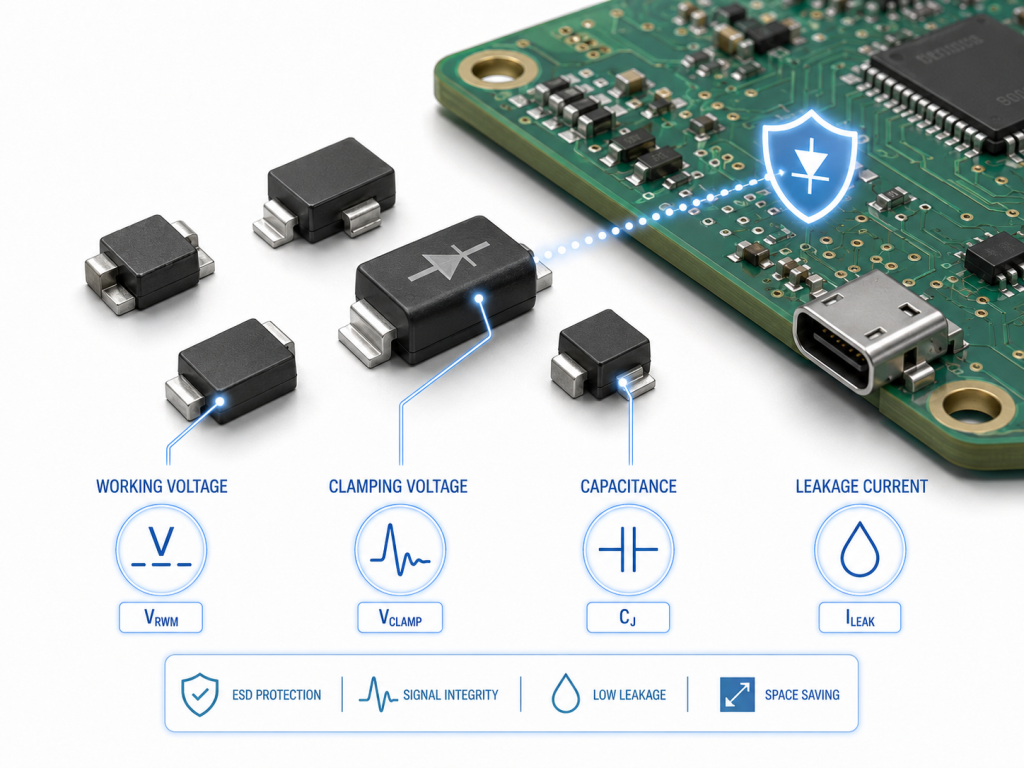
Choose the right ESD Protection Diode by checking normal working voltage first, then clamping voltage, dynamic resistance, capacitance, leakage current, channel count, package, and ESD rating.
A poor choice can create two different problems. If the working voltage is too low, the diode may conduct during normal operation. If the capacitance is too high, it may distort high-speed signals. If the clamping voltage is too high, the protected IC may still be exposed to damaging stress.
Use this basic selection flow:
1. Confirm the normal signal voltage
For example, 1.8V, 3.3V, 5V, 12V, or 24V.
2. Select suitable VRWM
The reverse working voltage should be higher than the maximum normal line voltage.
3. Check clamping voltage
Lower clamping voltage usually gives better IC protection.
4. Check junction capacitance
USB, HDMI, RF, Ethernet, and other high-speed lines need low capacitance.
5. Check leakage current
This matters for battery devices, sensors, and precision analog inputs.
6. Check channel count and package
Multi-line arrays save space and simplify layout.
7. Check system-level ESD requirement
Many products are designed around IEC 61000-4-2 test levels.
What Parameters Matter Most in an ESD Protection Diode Datasheet?
The most important datasheet parameters are VRWM, VBR, VC, RDYN, Cj, IR, peak pulse current, package, and IEC 61000-4-2 rating. These values decide whether the diode can protect the circuit without disturbing normal operation.
| Parameter | Meaning | Practical Selection Rule |
|---|---|---|
| VRWM | Reverse working voltage | Must be higher than the maximum normal signal voltage |
| VBR | Breakdown voltage | Shows when the diode starts conducting strongly |
| VC | Clamping voltage | Lower VC generally gives better IC protection |
| RDYN | Dynamic resistance | Lower RDYN helps reduce clamping voltage during ESD |
| Cj | Junction capacitance | Critical for USB, HDMI, RF, Ethernet, and high-speed lines |
| IR | Reverse leakage current | Important for low-power, sensor, and precision circuits |
| IPP | Peak pulse current | Indicates transient current handling capability |
| IEC Rating | System-level ESD withstand reference | Commonly checked against IEC 61000-4-2 |
| Package | Physical size and pin arrangement | Affects routing, parasitic inductance, and assembly yield |
For high-speed ports, Cj may be just as important as clamping voltage. A diode with strong protection but high capacitance can weaken signal integrity. For low-speed GPIO or buttons, capacitance is usually less critical, while clamping voltage and leakage may matter more.
Unidirectional vs Bidirectional ESD Protection Diode: Which One Should You Use?
Use a unidirectional ESD Protection Diode for mostly positive DC signals and a bidirectional ESD Protection Diode for signals that swing above and below ground or differential communication lines.
| Type | Best For | Signal Behavior | Main Advantage | Design Note |
|---|---|---|---|---|
| Unidirectional | DC power, GPIO, positive logic lines | Mainly positive voltage | Often lower clamping in one direction | Not ideal for bipolar signals |
| Bidirectional | USB, CAN, RS-485, AC-coupled lines | Positive and negative swings | Handles both polarities | Check capacitance and clamping voltage |
| Diode Array | USB, HDMI, SIM card, multi-line interfaces | Multiple signals | Saves PCB space | Layout symmetry is important |
| Ultra-Low-Cap Diode | RF, HDMI, high-speed USB | Very sensitive signals | Reduces signal loading | May have lower surge energy |
For example, a push button connected to a 3.3V MCU input may use a single unidirectional diode. A CAN bus or USB differential pair usually needs bidirectional or specialized low-capacitance protection.
What Is an ESD Protection Diode Circuit?
An ESD protection diode circuit places a fast clamping device between an external signal line and ground or a reference rail. The purpose is to create a low-impedance discharge path before the transient reaches the IC.
A basic protection circuit usually includes:
- External connector
- Short trace to the protection diode
- Protected trace to the IC
- Low-impedance ground connection
- Optional series resistor, common-mode choke, or filter component
Common circuit styles include:
| Circuit Type | Common Use | Design Focus |
|---|---|---|
| Single-Line Protection | GPIO, button, reset pin, sensor input | Low leakage and proper voltage rating |
| Multi-Line Diode Array | USB, HDMI, SIM, keypad, data bus | Compact layout and matched routing |
| Differential Pair Protection | USB, CAN, RS-485, Ethernet | Low capacitance and balanced layout |
| Power Input TVS Protection | DC input, adapter input, automotive rail | Higher surge current capability |
| ESD + Common-Mode Choke | USB, HDMI, noisy cable interface | EMI and ESD coordination |
The diode should not be placed randomly. Its location and return path decide whether the ESD current flows safely to ground or travels across the PCB first.
Where Should You Place an ESD Protection Diode in PCB Layout?
Place the ESD Protection Diode as close as possible to the connector or ESD entry point. The trace from connector to diode should be short, and the ground path should be direct and low impedance.
Good layout often matters as much as component selection. Even a strong protection diode may perform poorly if the discharge path is long, narrow, or routed through sensitive areas.
Use this PCB layout checklist:
- Place the diode near the connector, not near the IC.
- Keep the trace from connector to diode as short as possible.
- Avoid long stubs on high-speed lines.
- Use a nearby ground via or multiple ground vias.
- Connect to a solid ground plane when possible.
- Keep the ESD current path away from sensitive analog or clock circuits.
- Maintain differential pair symmetry for USB, CAN, HDMI, and Ethernet.
- Avoid routing protected and unprotected traces in parallel for long distances.
- Keep loop area small to reduce parasitic inductance.
A common layout mistake is placing the diode close to the IC. This allows the ESD pulse to travel across the board before reaching the protection device. The better approach is to stop the surge at the board entrance.
How Do You Select ESD Protection Diodes for USB, CAN Bus, and High-Speed Interfaces?
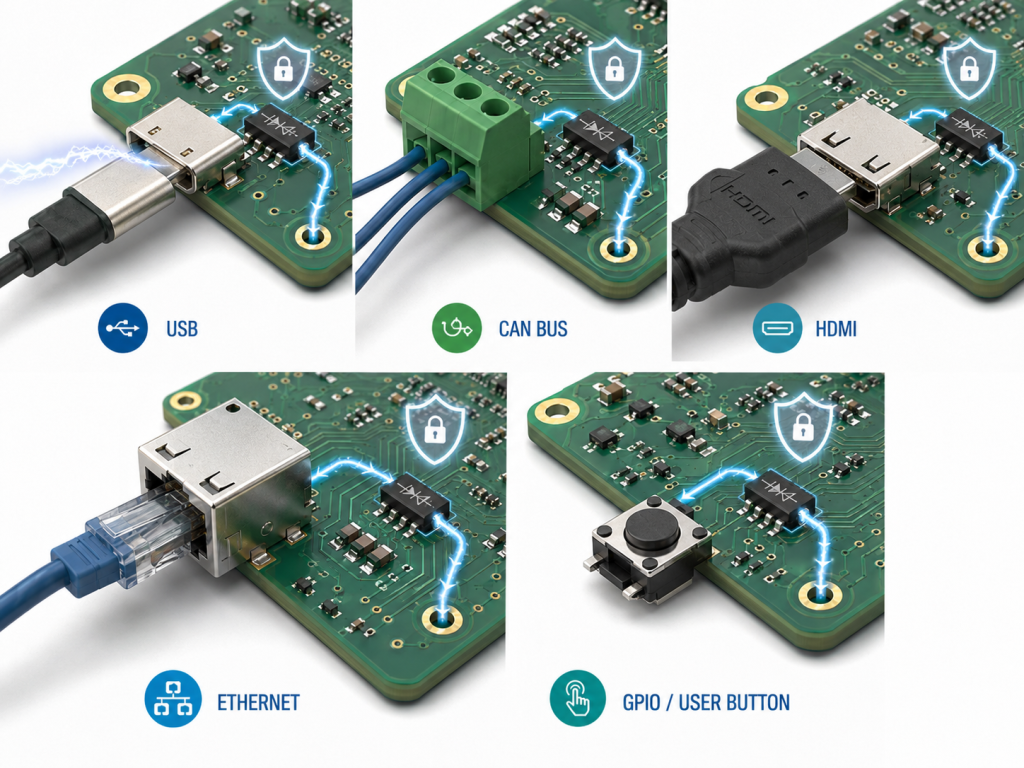
For USB, CAN bus, HDMI, Ethernet, and RF interfaces, select the diode based on both protection level and signal integrity. Low capacitance, proper working voltage, and clean layout are essential.
| Interface | Typical Design Concern | Recommended Focus | Common Mistake |
|---|---|---|---|
| USB 2.0 D+/D- | Signal quality and eye diagram | Low capacitance, matched routing | Using high-capacitance diode |
| USB-C CC Pins | Plug orientation and user handling | Correct voltage rating and compact array | Protecting D+/D- but ignoring CC pins |
| USB-C VBUS | Higher voltage and cable events | Suitable VRWM and surge robustness | Using a signal diode on power line |
| CAN Bus | Industrial and automotive transients | Bidirectional protection and robust grounding | Weak return path to ground |
| RS-485 | Long cable exposure | Bidirectional protection, surge coordination | Protection placed far from connector |
| HDMI | Very high-speed differential signals | Ultra-low capacitance | Long stub from signal line |
| Ethernet | Cable discharge and isolation structure | Interface-specific ESD solution | Poor routing around magnetics |
| RF / Antenna | Frequency response and insertion loss | Ultra-low capacitance and RF layout | Diode capacitance detunes the path |
For high-speed PCB design, protection should not be treated as an afterthought. The footprint, stub length, via position, and grounding style can all influence signal behavior.
How Do You Test an ESD Protection Diode and the Final PCB?
A single ESD Protection Diode can be checked for obvious damage, leakage, and electrical behavior, but the final protection result should be verified at system level. The PCB layout and enclosure design also affect real ESD performance.
Basic component-level checks include:
- Visual inspection for package damage
- Diode mode test for obvious short or open failure
- Leakage current test when required
- Capacitance review for high-speed applications
- Comparison with datasheet limits
System-level checks may include:
| Test Item | Purpose | What to Watch |
|---|---|---|
| IEC 61000-4-2 Contact Discharge | Tests direct discharge to exposed metal or test points | Functional reset, latch-up, permanent damage |
| IEC 61000-4-2 Air Discharge | Tests discharge through air gap | Instability, communication loss |
| Post-Test Functional Check | Confirms product still works | USB, CAN, sensors, buttons, display |
| Signal Integrity Test | Confirms diode does not disturb data | Eye diagram, bit errors, impedance change |
| Thermal / Reliability Review | Checks long-term robustness | Repeated stress or marginal layout |
Common IEC 61000-4-2 reference levels:
| IEC Level | Contact Discharge | Air Discharge | Typical Use |
|---|---|---|---|
| Level 1 | 2 kV | 2 kV | Low-risk controlled environment |
| Level 2 | 4 kV | 4 kV | Basic consumer products |
| Level 3 | 6 kV | 8 kV | Products with higher user exposure |
| Level 4 | 8 kV | 15 kV | Common target for robust interface design |
A board can pass component selection review and still fail system ESD testing if the diode is placed poorly. For this reason, DFM review and layout review should happen before fabrication.
What Common Mistakes Should You Avoid in ESD Protection Design?
The most common mistake is assuming that adding an ESD Protection Diode anywhere on the schematic guarantees protection. In real PCB design, the current path decides the result.
Avoid these problems:
- Choosing VRWM lower than the normal line voltage
- Using high-capacitance protection on high-speed signals
- Placing the diode too far from the connector
- Creating a long stub on USB, HDMI, or RF traces
- Using a weak or indirect ground path
- Ignoring connector shield grounding strategy
- Protecting only one line in a differential pair
- Forgetting exposed pins such as USB-C CC lines
- Using one diode type for every interface
- Skipping system-level ESD testing
A better design starts with the interface, not the diode. First define voltage, signal speed, exposure risk, and test target. Then choose the protection device and layout strategy together.
How Can PCB Manufacturing Quality Affect ESD Protection Performance?
PCB manufacturing quality affects ESD protection because trace geometry, via quality, soldering, surface finish, impedance control, and assembly accuracy all influence the final discharge path. A well-selected diode still needs a stable PCB process.
Important manufacturing factors include:
- Accurate footprint and solder pad design
- Controlled solder mask clearance
- Clean assembly around small SMD packages
- Reliable ground via plating
- Stable impedance for high-speed traces
- AOI inspection for solder bridges or missing parts
- X-ray inspection when package style requires it
- Electrical testing and functional verification
- Traceability for components and production batches
For USB, HDMI, RF, and communication boards, PCB fabrication and PCBA assembly should be reviewed together. The ESD diode, connector, ground reference, and controlled impedance traces are part of the same protection system.
FAQs About ESD Protection Diode
Q1: What does an ESD Protection Diode do?
A1: It protects sensitive IC pins by clamping sudden electrostatic discharge voltage and redirecting transient current away from the chip. It is commonly used near connectors, buttons, communication ports, and exposed PCB interfaces.
Q2: How do I choose an ESD Protection Diode?
A2: Start with the protected line voltage. VRWM must be higher than the maximum normal voltage. Then compare clamping voltage, dynamic resistance, capacitance, leakage current, channel count, package, and system-level ESD rating.
Q3: Is a TVS diode the same as an ESD Protection Diode?
A3: They overlap, but they are not always identical. Many ESD protection diodes are TVS-style devices, but TVS diodes may also be designed for higher-energy surge or power-line transient protection.
Q4: Where should I place an ESD Protection Diode on a PCB?
A4: Place it close to the connector or ESD entry point. Keep the discharge path short, use a low-impedance ground connection, and avoid long branches between the connector and protection diode.
Q5: Can an ESD Protection Diode affect USB or high-speed signals?
A5: Yes, mainly through junction capacitance and poor layout. For USB, HDMI, RF, and Ethernet lines, use low-capacitance ESD diodes and keep routing balanced with minimal stub length.
Q6: Do all external connectors need ESD Protection Diodes?
A6: Not always, but every user-accessible or cable-connected interface should be evaluated. USB, CAN, Ethernet, buttons, sensor cables, and programming ports are common candidates.
Q7: What is an ESD protection diode array?
A7: An ESD protection diode array integrates multiple protection channels into one package. It is useful for USB, HDMI, keypad, SIM card, and other multi-line interfaces where PCB space and routing consistency matter.
Q8: How do I test an ESD Protection Diode?
A8: Basic checks include diode mode testing, leakage review, capacitance verification, and visual inspection. For real product validation, system-level ESD testing is more meaningful than checking the component alone.
Conclusion
An ESD Protection Diode is a small component, but its impact on PCB reliability can be significant. The right choice protects connectors, IC pins, communication ports, and user-accessible interfaces from sudden discharge events. The wrong choice may add capacitance, clamp too late, leak current, or fail to protect the circuit because of poor layout.
For reliable PCB design, focus on the full protection path: interface risk, working voltage, clamping voltage, capacitance, package, PCB placement, ground return, and final testing. This approach helps the board survive real handling, cable plugging, production testing, and field use with greater stability.
Need support with PCB design review, ESD protection layout, PCB fabrication, component sourcing, or PCBA assembly? Send your Gerber files, BOM, drawings, or project requirements to Melson. Our team can support DFM review, PCB manufacturing, turnkey PCBA assembly, testing, and production-quality control for communication, industrial, medical, automotive, consumer, and high-reliability electronics projects.